Chronicle vs. Manual Slack Channel Archiving
Archiving Slack channels by hand works for a small team. It falls apart once you're managing hundreds of channels. Here's how manual archiving compares to using a dedicated tool.
July 16, 2026
What Manual Slack Channel Archiving Actually Involves
Slack's native archiving is simple in theory: open a channel, go to settings, click archive. But "simple" doesn't mean "scalable." When you're doing this manually across a large workspace, a few problems show up quickly.
You have to find the channels first. Slack doesn't proactively tell you which channels have gone quiet. Someone has to scroll through the full channel list, guess at activity levels, or open each one individually to check the last message date. In a workspace with a few hundred channels, this alone can take hours.
There's no audit trail. Once a channel is archived manually, Slack doesn't automatically log who archived it, when, or why. If someone asks six months later why a channel disappeared, you're relying on memory or Slack's limited admin logs — neither of which is a great system of record.
It's easy to archive the wrong channel. Without a clear, repeatable process, manual archiving is prone to human error. A channel that looks inactive might still be referenced in bookmarks, pinned in a wiki, or quietly used by a subset of the team. Manual review often misses this context.
It doesn't scale with team growth. As your organization adds channels — for new projects, new hires, new integrations — the backlog of channels that need review only grows. Manual archiving becomes a recurring, unbudgeted chunk of admin time that someone has to keep prioritizing.
What a Dedicated Tool Like Chronicle Changes
Chronicle is built specifically to manage the lifecycle of Slack channels, rather than treating archiving as a one-off manual task. A few things stand out when you compare it to doing this by hand:
- Automatic detection of inactive channels. Instead of manually checking activity across hundreds of channels, Chronicle surfaces the ones that have gone quiet based on real usage data — so your workspace admins spend their time making decisions, not hunting for information.
- A clear, consistent process. Because archiving runs through a defined workflow rather than ad hoc clicks, every channel gets treated the same way. That consistency matters when you're managing archiving across multiple teams or admins.
- Visibility and control. Chronicle gives workspace managers a clear view of what's been archived, what's pending, and what's still active — reducing the "wait, why did that channel disappear" conversations that come up with manual processes.
- Time back for the people managing your workspace. The core value proposition is straightforward: what used to take hours of manual review can be handled in a fraction of the time, freeing up whoever owns Slack administration to focus on higher-value work.
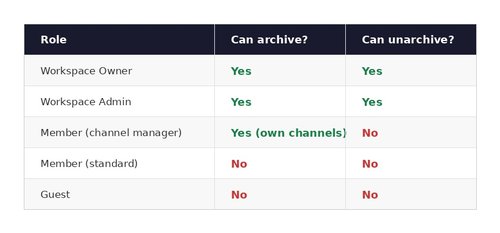
Manual Archiving vs. Chronicle: A Side-by-Side Look
Which Approach Is Right for Your Team?
If your workspace has a small number of channels and infrequent archiving needs, manual archiving might still be manageable. But for any organization managing a growing or already-large Slack workspace — especially one with multiple teams creating channels independently — manual archiving tends to become a quiet time sink that never quite gets prioritized.
That's the gap Chronicle is built to close. It takes channel archiving from a manual, easy-to-deprioritize task and turns it into a managed, repeatable process — so your workspace stays organized without someone having to make it a part-time job.
If you're currently managing Slack channel archiving by hand and want to see what a more structured approach looks like, Chronicle is built to help.